Project Overview
Online Accounting Web Application is an integrated system that manages financials and accounting operations for a Judicial Administrative Company, making invoice handling, payment transactions, reminder setting, and accounting easy. The system is capable of supporting different kinds of users like Lawyers, Firm Managers, Companies, and Adjusters who can log in and manage their invoices.
The system allows paying the invoices using different modes and makes the payments automatic using the set preferences. Also, it makes sending reminders by email, fax, and printing easy and reduces the need to follow up on payments manually. The system also enables importing CSV data from QuickBooks, which facilitates transferring the accounting data easily into the centralized system.
Project Objectives
- Centralization of invoicing and payment processing.
- Easing online payment for invoices.
- Handling various users based on their role.
- Automating reminders for payment.
- Importing accounting information from QuickBooks through CSV files.
- Reducing manual management of invoices and transactions.
- Creating customizable transaction and communication templates.
Let's Shape Your Project Together
Have an idea, a challenge, or a new project in mind? Our team is here to help.
Business Challenges
1. Manual Invoice and Payment Management
Handling high numbers of invoices manually may cause delays in payments, tracking problems, and additional administrative workload. A unified system for invoice handling was needed.
2. Multiple User Roles
Legal experts, company managers, companies, adjusters, administrators, and super administrators should have access to various types of financial information and operations. Handling permissions properly was one of the requirements.
3. Inconsistency in Following Up Payments
Manual follow-up of the payments may cause delays in collecting payments due to inconsistencies. Automated following up the payments depending on user preferences was a necessary feature.
4. Accounting Information Import
Information about accounting that is kept in QuickBooks had to be imported into the application. Manual import would add to administrative workload and the risk of making mistakes.
5. Various Late Fee Policies
Late fees may differ depending on the payment deadlines of different invoices. Late fee calculation had to be flexible, including a percentage or fixed-amount fee with a grace period.
Our Solutions
In order to solve the problems with manual invoice management, follow-ups of payments, and disconnected data in the accounting system, we have designed a central system called “Online Accounting Web Application”. The system is designed to provide functions of invoice management, payment processing, transaction templates, automatic reminder generation, setup of late fee charges, and data import from QuickBooks.
Centralized Invoices & Payments Management
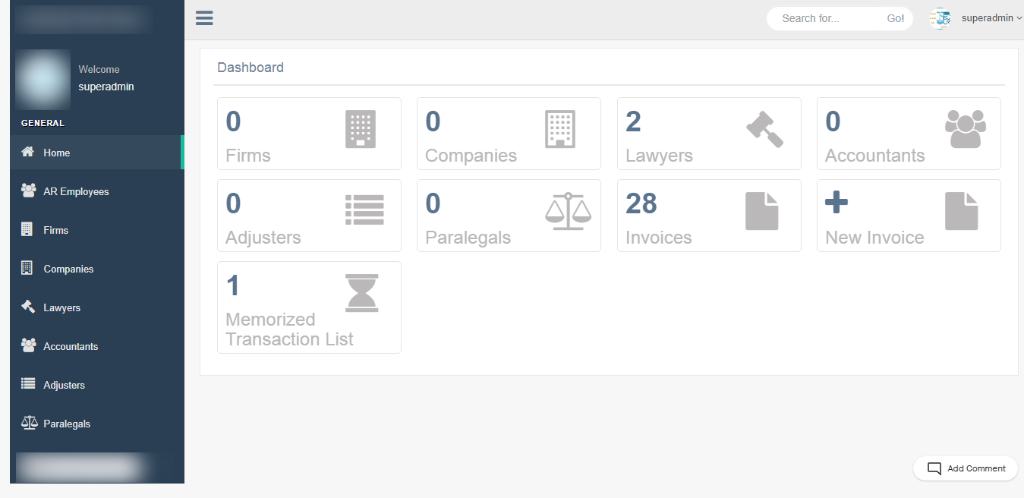
Administrators and authorized users will be provided with the ability to manage their paid and unpaid invoices. The user will be able to filter invoices by category and payment status and make payments through selected payment methods.
Automatic Reminders & Communications
The application will automatically generate notifications about invoices and payment reminders according to a set schedule and user needs. The communication can be made via email, fax, or print.
Key Benefits
-
Centralize invoice and payment management.
-
Automate payment reminders and notices.
-
Support multiple online payment methods.
-
Import accounting data from QuickBooks.
-
Simplify recurring transaction creation.
-
Configure percentage-based and flat-rate late fees.
-
Improve financial data organization.
-
Reduce manual administrative tasks.
Key Features
Invoice Management
Manage paid and unpaid invoices with filtering based on categories and payment status. Administrators and authorized users can view invoice details and manage payment activities.
Online Payment Management
Allow users to pay invoices using Pay Now, new credit card or bank account details, and paycheck-based payment options.
Memorized Transactions
Create reusable transaction templates containing previously entered details. Administrators and super administrators can create, manage, and reuse memorized transaction records.
Late Fee Integration
Configure late-fee rules based on payment deadlines and grace periods. The system supports both percentage-based and flat-rate late fees.
Automated Reminder Management
Schedule and send invoice reminders and notices based on configured timing preferences.
Communication Templates
Create reusable email templates for invoice notices, reminders, and other financial communications. Administrators and super administrators can add, edit, and delete templates.
QuickBooks CSV Import
Import accounting data from QuickBooks through CSV files to simplify data migration and reduce manual entry.
Multi-User Access
Support different user types, including Lawyers, Firm Managers, Companies, Adjusters, Administrators, and Super Administrators, with appropriate access to financial information and system functions.
Payment Tracking
Track invoice payment status and distinguish between paid and unpaid transactions for easier financial monitoring.
Technology
| Frontend | Web-Based Application |
| Backend | PHP, Laravel |
| Database | MySQL |
| Accounting Integration | QuickBooks CSV Import |
| IDE / Tools | NetBeans |
| Architecture | Web Application Architecture |
| Data Import | CSV |
Business Results
35%
Faster Invoice Processing
Centralized invoice management and streamlined payment workflows reduced the time required to process and track invoices.
40%
Improved Payment Follow-up Efficiency
Automated reminders and scheduled notifications improved the consistency and efficiency of invoice follow-ups.
30%
Reduced Manual Data Entry
QuickBooks CSV import and reusable transaction templates reduced repetitive financial data-entry activities.
25%
Improved Financial Data Management
Centralized invoice, payment, transaction, and reminder management improved access to organized financial information.
Product Gallery
Planning a Similar Web App Project?
Whether you’re building from scratch, modernizing an existing application, or expanding your engineering team, our experts are ready to help.
- 450+ Engineers
- 14+ Years
- Flexible Engagement
- US Business-Hour Collaboration
Frequently Asked Questions
It is an accounting management web application that helps you manage invoices, payments, reminders, transactions, and financial communication from a single platform.
The application can be used by Lawyers, Firm Managers, Companies, Adjusters, Administrators, and Super Administrators.
Yes. It is possible to pay your invoices via supported payment options like credit card or bank account.
Yes. Importation of your accounting data via CSV files from QuickBooks is allowed.
Yes. It is possible to set your reminder preferences where you can set your reminders through email, fax, or printout.
Yes. You can configure your late fees using either a percentage or an amount, with grace periods.