


Custom Website vs WordPress vs Headless CMS: What Should You Choose?

Key Takeaways:
- Choose the right platform to cut rebuild costs, improve performance, and support long-term digital growth
- WordPress is cheapest and fastest; custom and headless scale better for complex, high-traffic businesses
- Match architecture to goals:
content → WordPress, product logic → custom website development, omnichannel → headless
- Avoid plugin overload, weak planning, and cheap freelancers that create technical debt and security risks
- Define 3 to 5 year roadmap, budget realistically, and hire dedicated developers for scalable execution
In 2026, your website isn’t just a digital brochure that talks to users about what you can provide. It is your sales engine, customer experience and brand assets all rolled into one. Yet, most businesses choose their web development platforms based on familiarity instead of future readiness.
If you are debating between a custom website development vs WordPress development vs headless cms development, you aren’t just thinking about design; you are also planning for scalability, performance, AI-readiness and integrations that can deliver long-term value and ROI.
The wrong choice will translate into expensive rebuilds, while the right selection will foster business growth. In this guide, we will help you make a strategic platform decision, one that aligns with the future of your business.
Questions to Ask Yourself Before Choosing Any Platform
Pause before you start comparing the platforms for features, pricing and tech stacks. The real decision cannot be made over which platform is better. It is done when you ask the crucial question: What does your business aim to achieve with this website over the next 3 to 5 years? If you rush through this step, you might invest in expensive rebuilds within a year or max two.
#1. Business Clarity First
For business clarity, you should begin with the fundamentals. Are you planning a content-heavy website filled with blogs, and landing pages or a web application with dashboards , user roles ane real-time data? The technical path for each is distinctly different.
Next, you should understand the current traffic on your site or application while realistically planning for future years. If your current traffic is 100 and you expect 10000 over the next year, you might want to create a platform accordingly. Remember, a platform that works well for 10k users might struggle for 50k.
Do you plan to launch a mobile application soon? Also think through the APIs (if any) that you wish to connect with the web app or website. This is very crucial when planning an omnichannel roadmap, as you need an architecture to support the plan.
Plan the workflows as well. Determine if you need complex approval systems , multi-lingual solutions and dynamic pricing. If you have a high-logic solution underway, you might need more flexibility in terms of architecture.
Lastly, think through maintenance and scalability. Who will help you scale the solution in the future? It could be an internal team or offshore partners but, but planning it from the start can help make crucial platform decisions.
#2. Hiring Bridge
Along with business clarity, you should also plan for hiring. If you don’t have in-house capabilities for the particular solution, you might want to engage web engineers from the early stages. Hire Dedicated Developers would save you a lot of effort and costs. Hiring from the start would also help gain technical guidance from the start.
Option #1 “ WordPress Development
WordPress isn’t outdated as you may believe. In fact, it may be the smartest and a very practical choice for certain use cases.
By definition, WordPress is a content management system that was specifically built for blogging. today, it has evolved into a flexible platform that powers company sites, marketing websites and small eCommerce stores.
It is perfect if your primary goal is publishing content and generating leads. For a small-to-mid business , WordPress guarantees a professional online presence without upfront investment. Owing to its mature SEO ecosystem, it can also help optimize content, letting you generate organic traffic seamlessly.
WordPress lets you simplify complex dashboards, accelerate their launches and iterate quickly.
Strengths of WordPress Development
WordPress is known for its speed; it is not just the site speed but also the execution speed. You can set up the website quickly using pre-built themes and page builders, accelerating time-to-market.
As the ecosystem is massive, you will find thousands of plugins , including SEO tools, forms and analytics, to extend functionality. This flexibility helps reduce development effort. Moreover, the cost of developing with WordPress is significantly lower than custom solutions.
As a growing business, WordPress lets you validate ideas, test campaigns and generate leads without committing to a large budget.
Where WordPress Becomes a Struggle
The struggle really starts when the traffic on the website starts growing rapidly. At this point, WordPress will begin to strain, especially without proper optimization and hosting infrastructure. The reason being it wasn’t designed for complex and high-scale solutions.
As your solution demands custom workflows, dynamic dashboards or even heavy API integrations , things start getting complicated. Eventually, you will begin stacking plugins to make the system work.
It can also lead to plugin conflicts while updates break the features indicating maintenance issues. In this case scaling can become reactive.
Limitations of WordPress
With time, you might experience performance bottlenecks, especially when the multiple plugins increase the coding layers and Security Vulnerabilities. This dependency on third-party plugins can increase risks. However, if you are unable to maintain this, you can inherit multiple issues.
This might increase technical debt, converting your simple website into a fragile system.
Best Fit of WordPress Website Development
WordPress is best suited for content-driven businesses , MVP sites and even marketing-led organizations. If your aim to improve visibility, lead generation and execution, it becomes a strong choice.
Option #2 “ Custom Website Development
If you are not building a digital product instead of a website, you might want to think about custom website development services. In the case of custom web development, you build the solution from the ground up. In this way, you can design the solution specifically for your business, logic, integrations and workflows.
When Custom Web Makes Sense
When you are building SaaS products, multi-vendor marketplaces or even enterprise portals and internal business platforms with heavy integrations, custom web development is a great approach. You can consider this method if your website is crucial to your business operations, instead of being another marketing solution. It will become a strategic asset instead of technical one.
Strengths of Custom Website Development
Its biggest advantage is the 100% flexibility it offers. You aren’t working around themes or plugin limitations anymore. You can build workflows, dashboards, experiences and automations that are designed to meet your unique business needs.
Owing to a clean architecture, you will note better performance. Moreover, there is no unnecessary code because of plugins, ensuring every line serves a purpose. It also enhances security while reducing dependencies and vulnerabilities.
As more users, data and integrations are added to the growing business website , the custom-built solution can scale predictably.
Where Custom Website Development Becomes a Struggle
Custom Website development works great when you have complete clarity. Poor planning can increase timelines and an unclear scope can lead to budget overruns.
If you hire web developers who have industry-specific experience to get the work done, it can also increase the expenses. It can become a struggle when you make architecture decisions that are hard to undo later.
Limitations of Custom Website Development
High upfront investment is the biggest disadvantage. Moreover, you need experienced engineers who understand security, long-term maintenance and scalability to get the work done. If you don’t have the right expert team , the development will end up being expensive experimentation.
Best Fit of Custom Web Development
It is best for growth stage startups, SME and enterprises , where the website is a product. You can also go with it if you need unique workflows and integrations to deliver smooth experiences with a competitive edge.
Option #3 “ Headless CMS Development
If you want to build a scalable digital ecosystem , headless CMS could be your go-to approach. A lot of modern and high-growth brands are gradually moving towards this architecture. The top 5 headless CMS platforms are Sanity, Contentful, Strapi, Storyblok and Hygraph.
When Headless CMS Makes Sense
A headless CMS would separate your content backend from the frontend layer. Simply put, content will live in one location and can be delivered everywhere from websites to smartwatch apps and kiosks.
If you are working on an omnichannel strategy , which includes web, mobile and other digital touchpoints, you will gain flexibility with this model. It is powerful, especially for high-performing SEO sites where speed and experience matter.
In case of content heavy ecosystems having multiple authors, regions and languages, headless lets you work with structured content management without locking you into a single frontend system. This works best if you are working with API-first architecture.
It supports scalability without letting you rebuild or improve with custom CMS development services providers the frontend as your business evolves.
Strengths of Headless CMS
Exceptional frontend performance is one of the biggest advantages having headless. With modern frameworks like React and Next.js, you can build fast and dynamic user experiences. It can also improve Core Web Vitals while serving a strong SEO performance.
It also extends flexibility across devices as content isn’t tied to a single template system. As content is already structured, you can launch a new app and make content accessible via APIs for better EEAT.
Integrations are smoother with headless CMS as they are built for connectivity. Basically, it is a future-proof architectur e, designed for evolving businesses.
Where Headless CMS Becomes a Struggle
Headless can cause architectural complexity because you are managing separate systems for content and frontend. This means you will be handling multiple moving parts, like hosting, deployment pipelines, frontend frameworks and APIs, simultaneously.
You also need to work with a Premium CMS development team that understands modern JavaScript frameworks with complete knowledge of backend integrations. This will require experienced developers and proper planning to stay on budget and timelines.
If you are used to drag-and-drop builders, the headless workflow might seem less intuitive. Content updates are simple but, the structural and layout changes may need experienced developer.
Lastly, if your business doesn’t need an omnichannel delivery, the setup may seem overengineered.
Limitations of Headless CMS Development
Compared to a traditional CMS, headless needs more setup effort upfront as you are building separate content and presentation layers.
The costs will also increase due to development times , hosting environments and ongoing maintenance involved. You need a skilled team to design the architecture, close performance gaps and eliminate integration issues. Headless is great only when you align it with appropriate technical maturity.
Best Fit of Headless CMS
Headless CMS will work best growing and tech-driven companies that treat their digital infrastructure as a long-term infrastructure and not just another website.
Cost Comparison: What Does Each Option Really Cost?
It’s crucial to talk numbers at this point as budget decides reality. The question isn’t “which platform is cheaper?” But which platform will make the most financial sense to your business at this point?
Initial Development Cost: Custom Website vs WordPress vs Headless CMS
| Platform | Small Site | Mid-level Solution | Complex/Enterprise Grade |
|---|---|---|---|
| WordPress | $2k to $6k | $6k to $15k | $15k to $30k |
| Custom Build | $10k to $25k | $25k to $60k | $60k to $150k |
| Headless CMS | $15k to $40k | $40k to $90k | $90k to $200k |
If you are launching a small marketing site, WordPress is definitely affordable. It is also accessible and faster to deploy.
Custom builds and headless CMS, as can be seen from the table, are larger investments as you need to design architecture. There are more integrations, workflows and even scalability involved. As a result, it will increase the costs, but you will pay for long-term infrastructure.
Monthly Maintenance Cost: Custom Website vs WordPress vs Headless CMS
An at-a-glance view into the platform-wise monthly maintenance.
| Platform | Monthly Maintenance(Ballpark) |
|---|---|
| WordPress | $100 to $500 |
| Custom Development | $500 to $2000 |
| Headless | $800 to $3000 |
All these costs are inclusive of:
- Core and plugin updates
- Hosting and server management
- Security patches and monitoring
- Performance optimization, which includes speed improvements and caching
- Minor feature enhancements and UI adjustments
Let’s give you a clearer insight into this breakup
- For WordPress: $100 to $500 will cover managed hosting ($20-$50), premium plugin licenses ($20 to $100) and developer support time of about 3-5 hours
- For Custom Builds: $500 to $2000 will cover cloud hosting ($100 to $400), monitoring tools and security audits. It will also cover developer hours (5-15 hours) necessary for improvements and small feature changes.
- For Headless CMS: $800 to $3000. It accounts for the CMS subscription ($100 to $500+), frontend hosting and API monitoring along with structured developer support.
Maintenance isn’t just about keeping your site live. It is also about protecting the performance, security and scalability.
Insight
WordPress is cheaper, and perfect if your priority is speed-to-market with limited complexity. It is a financially attractive solution.
For scaling businesses, custom builds and headless architectures seem to be more cost-efficient with time. That’s because you won’t be rebuilding the solution every few years to fix performance or scalability issues.
WordPress will optimize for the current budget while custom and headless will optimize for tomorrow’s growth.
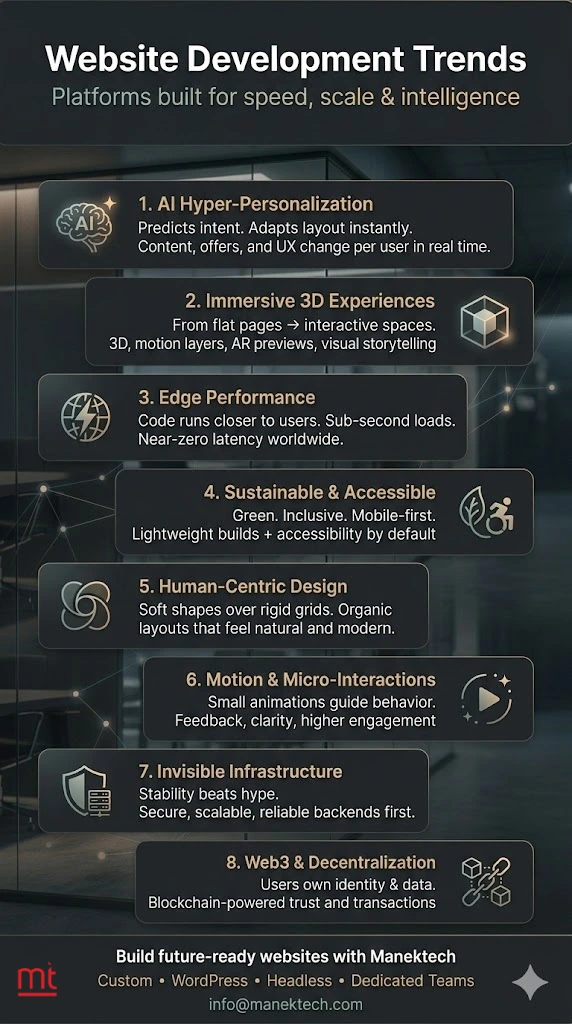
2026 & Beyond Website Development Trends
Your platform choices shouldn’t be based on the current needs of your business alone. Think futuristic and know if the current choice will make sense even after three years.
#1. Composable Architecture
Most organizations are moving away from monolithic systems. Composable architecture allows you to choose best tools for each function, CMS, commerce, analytics and connecting them seamlessly. So, instead of creating a bulky system that does everything well, you create a flexible stack that evolves with your business.
#2. Headless + API-first
Content is no longer created for websites alone; it is set to flow across web, mobile, customer portals and IoT devices. API-first systems can make this possible by ensuring content and services are reusable across touchpoints.
#3. AI Personalization
Static pages are gradually fading away from web and mobile apps. AI-backed personalization lets you create dynamic content based on user behaviour, location, preferences and intent. Users need relevance instead of generic messages.
#4. Performance-first Builds
Speed isn’t optional. Google’s Core Web Vitals influence your rankings and user retention. That’s why modern builds focus on lightweight frameworks, clean code and optimized assets from day one.
#6. Security & Compliance Focus
As your digital ecosystems evolve, your risks increase. Enterprise-grade security with data protection and regulatory compliance are essentials.
#7. Dedicated Remote Teams
Instead of hiring large in-house teams that cost you overheads, you can begin working with flexible and dedicated remote developers. They will scale alongside your project needs.
Custom Website vs WordPress vs Headless CMS: Practical Comparison “ At a Glance
Short on time? Don’t worry we have you covered. This table will give you a strategic overview of what each option offers and why it matters.
| Feature | WordPress | Custom Development | Headless CMS |
|---|---|---|---|
| Setup Speed | Fast. Uses pre-built themes and plugins, allowing fast launch | Medium as it requires complete planning, architecture setup and development cycles. | Medium. The backend and frontend are developed separately. Also needs structured setup. |
| Initial Cost | Low, making it ideal for startups and early stage growth | Medium-to-high. Investment for tailored architecture | Medium-to-high. Modern frontend with API infrastructure demand higher investment. |
| Flexibility | Limited. It is bound by themes and plugins | Very high. Tailored workflows and logic | Very high. Flexible frontend with structured content. |
| Performance | Moderate. It depends on hosting and optimization | High. Clean and purpose-built architecture | Very high. Optimized frontend frameworks can improve speed. |
| Scalability | Limited to medium. Will work till complexity increases | High. It is built to scale with infrastructure | Very high. Designed for multi-platform and global scaling. |
| Best For | Content sites and marketing funnels | SaaS products and enterprise systems | Omnichannel brands and tech-driven ecosystems |
The pattern in this case is clear. WordPress prioritizes affordability with speed. Custom development focusses on control and unique workflows while Headless offers scalability with long-term agility. The right choice will depend on whether you want speed, operational depth or ecosystem expansion.
Performance, Scalability & SEO Comparison (2026 Benchmarks)
Here’s how each platform performs in real enterprise-grade conditions.
| Metric | WordPress | Custom Development | Headless CMS |
|---|---|---|---|
| Page Speed | Medium. Owing to plugin heavy builds you experience slow performance | Fast- optimized codebase, built for the purpose | Very Fast, lightweight frontend frameworks. |
| Core Vitals | Plugin dependent and requires continuous tuning | Fully optimized. Controlled at architecture | Excellent. Designed for performance-first builds |
| SEO Control | Good owing to strong plugin ecosystem | Full. Technical SEO at code level | Full, structured content with clean frontend |
| Security | Moderate. Frequent updates needed | High. Controlled infrastructure | Very High. Reduced attack surface owing to API structure |
| Flexibility | Limited. Constrained by system design | Unlimited. Built around your business needs | High. Offers flexible frontend with structured backend |
| Scalability | Medium. Infrastructure updates needed | High. Scales with proper planning. | Very High. Built for omnichannel scaling |
| Dev Cost | Low. Accessible talent pool | High. Skilled engineers needed | Medium to high. Specialized modern stack skills needed |
In real enterprise conditions, architecture is more crucial than convenience. WordPress works best for content marketing while custom development works when business logic is complex. Headless CMS is best when performance and device flexibility are critical.
When to Choose Each Approach
You should choose your approach based on business goals instead of trends.
WordPress
You can choose WordPress if your objective is content distribution, lead generation and SEO growth. This is ideal for blogs, marketing pages and businesses that must validate campaigns quickly. In case you have a controlled budget with straightforward workflows, WordPress ensures simple execution without the heavy technical additions.
Custom Development
Choose custom development when the website has translated into your product. SaaS dashboards, B2B systems, booking engines and even enterprise portals need tailored workflows with deep integrations. By prioritizing functionality instead of content, custom development will give you a competitive edge.
Headless CMS
You should choose headless if you need to build a digital ecosystem. This works best when you want your web, mobile apps, customer portals and regional sites to share structured content. It is built for a performance-first experience with focus on global expansion.
Quick Decision Tree
If your primary goal is to publish content fast and drive SEO traffic, go with WordPress. It is both practical and efficient.
In case you want to build business logic while automating operations and extending in-depth integrations, custom development is a smarter path.
To deliver high-performing digital experiences and prepare for omnichannel expansion, you should opt for Headless CMS. This proposes long-term growth.
In 2026 and beyond, a winning strategy is not about a popular platform; it is about choosing the one that is aligned with your growth.
Which One Should You Choose?
Instead of asking which platform works best, you should begin the journey by asking which one would help you solve all issues that might come in the next 3-5 years. When you think through your business goals, evolving complexity and growth plans, the choice becomes clearer.
Choose WordPress If
Your primary focus is content, SEO and organic growth. You can launch faster, validate the campaigns swiftly and control costs from the start. It helps build simple workflows without the need for deep custom integrations or advanced user dashboards. This platform is best when speed and practicality are important to your business.
Choose Custom If
Your website is core to your product or operations. It is also a good choice if you need custom workflows, SaaS dashboards or custom portals. The functionality and user experience combined with content gives you the much-needed competitive advantage. It also provides control and flexibility along with long-term scalability.
Choose Headless If
You are building beyond a single website. If you are prioritizing omnichannel delivery across web, mobile and customer portals, performance-first architecture with future scalability, headless is what you need. It is ideal when you need rapid evolution or content to adapt to systems without rebuilding it.
That’s why it is important to note that your best choice isn’t the trendiest one; it is the one that is aligned with your growth trajectory.
Where Website Projects Go Wrong?
Most websites don’t fail because your platform choice was wrong; it happens because of premature decisions you make.
the first mistake would be picking a platform too early in your planning. A lot of businesses start with “We need WordPress” instead of “This is what we want to achieve with our platform.” With the former, they lock themselves into the constraints of the platform even before they define the requirements.
When you overuse plugins , it can be a common trap, especially when you use WordPress. While it seems convenient, you keep adding plugins to solve problems. Over time, plugin conflicts and performance slowdowns begin stacking up.
You may also note that hiring cheap freelancers can be risks. Low upfront cost could also mean weak architecture decisions that might increase costs while you try to fix them.
Scalability planning may also spark some issues. If your business site is built for current traffic instead of future growth, the site might struggle as integrations or traffic grows.
Lastly, ignoring maintenance can be a silent risk. You should remember that website isn’t a one-time expense. Every security patch, update and performance optimization needs continuous attention.
It is crucial to ensure proper execution along with the right platform choice to avoid risks.
When to Hire Dedicated Web Developers?
Platform choice isn’t the only decision to be made. You must also think through execution to c reate the differentiation. Hiring dedicated web developers can become a strategic asset for your business.
If you want to add custom features or deep integrations with your existing ERPs , payments systems and internal tools, you cannot proceed with ad-hoc freelancers. You need dedicated developers who plan the architecture properly from day one.
They will ensure that performance tuning and infrastructure planning is not reactive but consistent. Security and compliance are also reasons to hire dedicated development teams. Experienced engineers can ensure that sensitive customer data is safe and receives enterprise-grade protection.
Dedicated team can reduce coordination gaps, thus accelerating timelines for the SaaS and product-led companies.
Benefits of Hiring Experts
Dedicated development teams offer predictable delivery as there is ownership, documentation and accountability associated with this approach.
It is also a more cost-efficient approach when compared with full-time hiring. You can avoid the whole cycle involving recruitment, training and long-term overheads. They also extend long-term support with structured maintenance to protect the website’s performance and scalability.
As the dedicated team understands your architecture, execution is faster and chances of swift launch is higher.
Choosing the Right Developer Type
Custom website developers are great for unique solutions with complex workflows. WordPress developers can help with content-heavy sites that need frequent updates and marketing focus. You must hire Headless CMS developers when you are planning omnichannel platforms with high frontend performance and critical API integrations.
How to Make the Decision?
Always assess your project’s complexity honestly. Evaluate the budget and expected timeline as well. Lastly, plan for future growth instead of focusing on current needs. This way you would be able to choose the right platform, execution and hiring model.
How Manektech Helps Teams Build or Rebuild Websites
Whether you are launching with WordPress, building a scalable custom solution or adopting the headless CMS architecture, Manektech will support you at every stage. Our team can help with performance-first WordPress build, complex custom projects and API-first headless implementations designed for business growth.
Our dedicated developers will align with your roadmap to remove the execution challenges, and focus on delivering the desired solutions. We also provide s tructured maintenance, continuous updates, security enhancements and performance optimization to match your evolving needs.
We don’t just build websites; we deliver long-term digital infrastructure that scales with your business.
Conclusion
The smartest website decision isn’t made for today; it is usually made for the coming 3-5 years of your business.
If you need a fast and cost-efficient launch, prioritizing content and marketing momentum, you should choose WordPress. You can go with custom development to enable scalable and flexibility along with operational control and deep integrations.
For future-ready digital ecosystems with omnichannel delivery and long-term evolution, headless architecture is the answer.
However, it is the right development partner that determines whether the architecture will drive growth or limit your business evolution. ManekTech is a 14+ years experienced website development company with experience in custom builds, WordPress development and headless CMS. Talk to our experts to strategically plan your build for sustainable growth.
Frequently Asked Questions
A small WordPress website will cost between $2000 to $6000 while medium builds range from $6000 to $15000. Complex and high-traffic sites can exceed $20,000, depending on the scalability and security needs.
The custom website development cost starts at $10,000 and can go beyond $100,000. The total cost depends on integrations, dashboards, user roles and APIs.
Headless CMS development cost ranges from $15,000 to $40,000 for mid-sized platforms. It costs about $40,000 to $200,000 for enterprise builds that need advanced frontend frameworks.
Monthly maintenance costs for WordPress is between $100 and $500. It is between $500 and $2000 for custom websites and between $800 and $3000 for headless solutions. Maintenance includes hosting, updates, security patches, bug fixes and backups.
Initially it is cheaper. However, when you consider long-term, scaling and architecture, you will note that custom and headless are cost-efficient as it reduces plugin issues while ensuring fewer rebuilds.
You should hire dedicated web developers when your project timeline exceeds three months, needs complex features and consistent quality along with long-term support.
The cost of hiring a dedicated developer varies by expertise. They cost 40-60% less than in-house hiring as they save on recruitments, benefits and infrastructure.
If you are building a simple marketing website, you should hire WordPress developers. However, if you are planning SaaS, dashboards or enterprise solutions, go with a full web team having custom development expertise.
WordPress sites may take about 2-4 weeks while custom builds need 8-16 weeks. In case of headless CMS, you need to spend about 10-20 weeks.
Yes. however, it is important to note that migrations can add costs, increase SEO risks and downtime. By choosing scalable architectures, you can reduce long-term expenses.
AI-backed SaaS platforms, client portals and headless eCommerce are some website types dominating the modern web strategy.
Yes, headless delivers faster performance with flexible frontend and better integrations. That’s why they are best, especially for scalable businesses.
You can choose WordPress if you are planning a MVP or marketing site. However, choose custom if you need scalability and flexibility.
Slow website speed, conflicting plugins, security issues and even poor SEO signal that you need to rebuild the website.
To start a new website project, you must define the goals, choose the right platform, plan your architecture, hire experienced developers and launch an MVP.
More articles on the topic
An app's user base using Firebase Analytics, a free and unlimited analytics solution. You'll be able to learn who your users are and how they interact with your app.
7 Min ReadFeb 27, 24

Nikhil Solanki
Mobile Lead at ManekTech
Data Visualization technologies provide us with a proliferation of insights into the data obtained. Google and Microsoft, for instance, gather and utilize Big Data to shape the future of their commercial operations.
4 Min ReadFeb 29, 24
Ruchir Pandya
Delivery Head of Web at ManekTech